


Information
When working with Blueprints in Unreal Engine, graphs can quickly become large and difficult to read. One way to reduce some of that visual clutter is by using compact nodes.
Compact nodes allow certain Blueprint functions to appear as smaller, simplified nodes while keeping the same functionality. They are especially useful for small operations that appear frequently in a graph, helping reduce clutter and making connections easier to follow.
Prefer watching a video instead? Check out our Video Tutorial on this topic.
How compact nodes work
Compact nodes replace the standard function node appearance with a smaller version that uses a symbol or short label. The functionality remains the same, but the node takes up less space in the Blueprint graph.
A good example is the Increment Int node. Instead of displaying a large function name, the node is represented using the ++ symbol between its inputs and output.
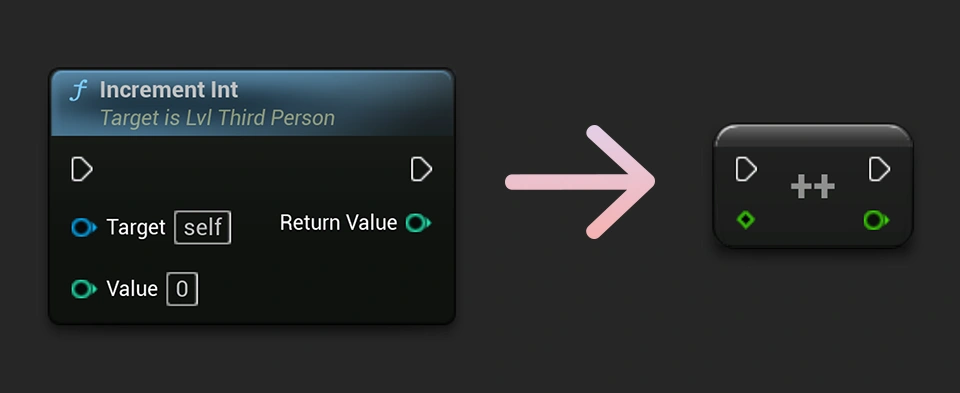
Common compact nodes
Many frequently used Blueprint operations use compact nodes. This includes addition, subtraction, multiplication, division, and many comparison nodes.
Because these operations often appear multiple times in a graph, their compact appearance can make larger Blueprint systems easier to organize and understand.
Compact nodes in C++
If you are creating Blueprint functionality in C++, Unreal Engine also allows you to define compact node information through function metadata: UFUNCTION(BlueprintPure, meta = (CompactNodeTitle = "++"))
Keep compact nodes readable
Compact nodes should still be easy to understand. A clear symbol or short label can improve readability, while an unclear abbreviation can make a graph more difficult to follow.
As with most Blueprint features, the goal is not simply to make everything smaller. The goal is to make your graphs easier to read and understand.