


Information
Unreal Engine can download images while your project is running, allowing you to load content from a URL without importing each image into the Content Browser beforehand.
This is useful for profile pictures, online artwork, or other images that users can choose themselves. The image is loaded at runtime and can then be displayed inside your interface.
Prefer watching a video instead? Check out our Video Tutorial on this topic.
Download an image from a URL
In a Blueprint Event Graph, add the Download Image node and provide the image address through its URL input. Trigger the node when the image is needed, such as when opening a profile or confirming an image address entered by the user.
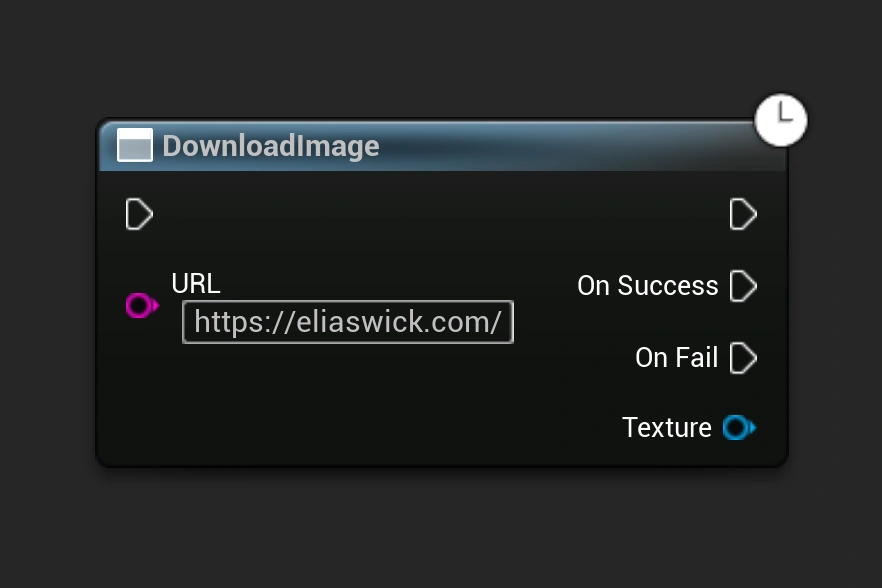
The URL should point directly to image data, rather than a web page containing an image. For an initial test, use a publicly accessible image address.
Wait for the download to finish
Downloading an image is an asynchronous operation. The request can take time, so the texture is not available immediately after the download begins.
Use On Success to continue once the image has been downloaded and decoded. Use On Fail to handle an unavailable address, connection problem, or image that could not be loaded.
A placeholder image can remain visible while the request is running. If the download fails, keep the placeholder or display a message instead of leaving the interface empty.
Display the downloaded image
Add an Image widget to a Widget Blueprint and make sure Is Variable is enabled so you can access it from the graph.
From the successful download, pass the returned Texture into Set Brush from Texture Dynamic, using your Image widget as the target. This node accepts the dynamic texture produced by the download.
Enable Match Size if the brush should use the downloaded texture's dimensions. For a fixed profile-picture area, leave it disabled and control the widget's size through your layout.
Reuse images that are already loaded
If the same image is displayed repeatedly, keep a reference to the downloaded texture so it can be reused during the current session. Avoid starting the same download every frame or every time the interface refreshes.
The Download Image node does not create a permanent Content Browser asset. Keeping the image between game sessions requires a separate saving or caching system.