

Information
When you run Play In Editor (PIE), Unreal automatically disables all Editor Utility Widgets. This means that you can't use any of their functionality during PIE. However, there is a way to enable them so they work during PIE, and it's just a small toggle in the widget class settings.
If you prefer to watch a video instead of reading, check out the YouTube tutorial series where I post a new Unreal Engine tutorial every day.
How to enable Editor Utility Widgets in PIE
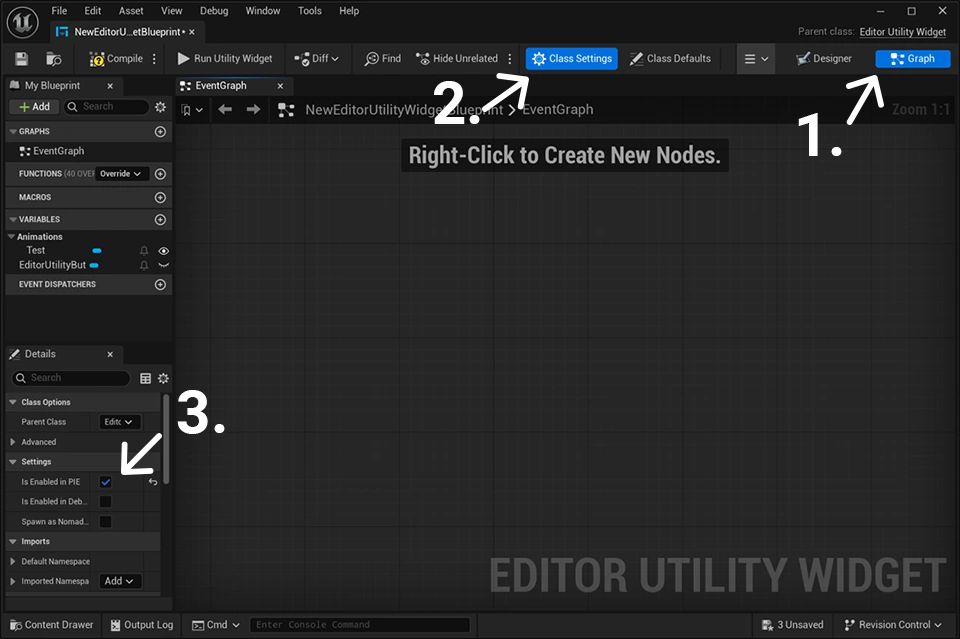
- Open your Widget and go to the Graph section, found in the top-right corner.
- Select Class Settings in the top center bar of the window.
- Go to the Details panel and scroll down until you find Settings.
- Check the Is Enabled in PIE property.
- Compile, save, and now you can use your Editor Utility Widgets in PIE.