


Information
Variable containers let you store multiple related values in Unreal Engine Blueprints. Instead of creating a separate variable for every item, you can keep a collection inside an Array, Set, or Map.
Each container organizes its values differently. Choosing the appropriate type makes it easier to add, remove, and find the information your Blueprint needs.
Prefer watching a video instead? Check out our Video Tutorial on this topic.
Choose a container type
Create a variable and select the type of data you want to store. Then use the container selector beside the variable type to choose an Array, Set, or Map. You can change the container type from the Details menu as well. Compile the Blueprint before editing its default entries.
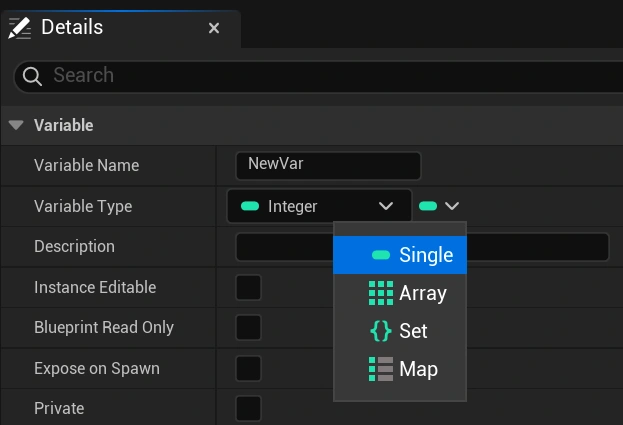
Arrays and Sets store elements of one selected type. Maps have a type for their keys and a type for their values, and these two types can be different.
Arrays store an ordered list of items
An Array stores values in a sequence. Each element has an index, starting at 0, which you can use to access its position in the collection.
Arrays allow duplicate values. For example, a list of patrol points can contain the same location more than once if a character should return to it later in the route.
Use an Array when order matters or when you need to access elements by their position. Remember that removing an element can change the indices of the elements after it.
Sets store unique values
A Set keeps each value only once. Adding a value that is already present does not create another copy of that entry.
For example, a Set of Names could track which checkpoints the player has visited. Visiting the same checkpoint again would not add a duplicate.
Sets are useful for checking whether a collection contains a value. They do not provide a dependable sequence, so avoid using their iteration order for gameplay that needs a specific arrangement.
Maps connect keys with values
A Map stores key-value pairs. Each key identifies an associated value, allowing you to look up information using something meaningful instead of an Array index.
For example, a Map could use an item Name as its key and an Integer as its quantity. Looking up HealthPotion would return the number of health potions stored in the inventory.
Keys must be unique, but multiple keys can have the same value. Adding an existing key updates its associated value. Use the Find node to check whether a key was found before relying on the returned result.