


Introduction
Post process materials let you modify the final image after Unreal Engine has already rendered the scene, kind of like adding Instagram or Photoshop filters to your pictures and videos. Instead of changing the material on each object, you apply an effect to the finished frame as a whole. This makes them useful for things like outlines, screen tinting, distortion, and other effects you can find on our site.
To understand how they work, it helps to first separate three related parts: materials, shaders, and post processing. These terms are closely connected, but they each describe a different part of the rendering pipeline.
Materials, shaders, and post processing
In Unreal Engine, a material is the system you use to describe how a surface should look. That includes things like base color, roughness, metallic values, normals, emissive effects, opacity, and more. In practice, materials are usually built in the Material Editor using nodes, but under the hood they compile down into shader code that runs on the GPU (Graphics Processing Unit).
So while people often casually use the words material and shader interchangeably, they are not exactly the same thing. A material is the higher-level authoring system inside Unreal, and the shader is the code that ultimately gets generated and executed by the graphics hardware. That distinction is worth knowing, even though in everyday conversation most artists and technical artists blur the line a bit.
Post processing is something different. Instead of shading a specific mesh or surface, post processing happens after the scene has already been rendered. Unreal draws the world first, including meshes, lights, shadows, materials, reflections, and transparency. Once that image exists, the engine can run a set of full-screen effects on top of it.
That is where features like bloom, exposure, color grading, depth of field, motion blur, vignette, ambient occlusion, and lens effects come in. These are not changing the underlying mesh materials directly, they are altering the final image.
Post process materials
A post process material is a special type of material that lets you modify the final image after Unreal Engine has rendered the scene. Rather than shading an individual mesh or surface, it affects the fully rendered frame, much like a custom camera filter, but with far greater flexibility and control.
You can create a post process material in the Material Editor by changing the Material Domain to Post Process. Once you do that, you gain access to Scene Textures, which are buffers that contain information from the rendered image, including color, depth, and other useful data. This data can be used to create a wide variety of full-screen effects, which makes the workflow very different from creating a standard material for a 3D asset.
Buffer data
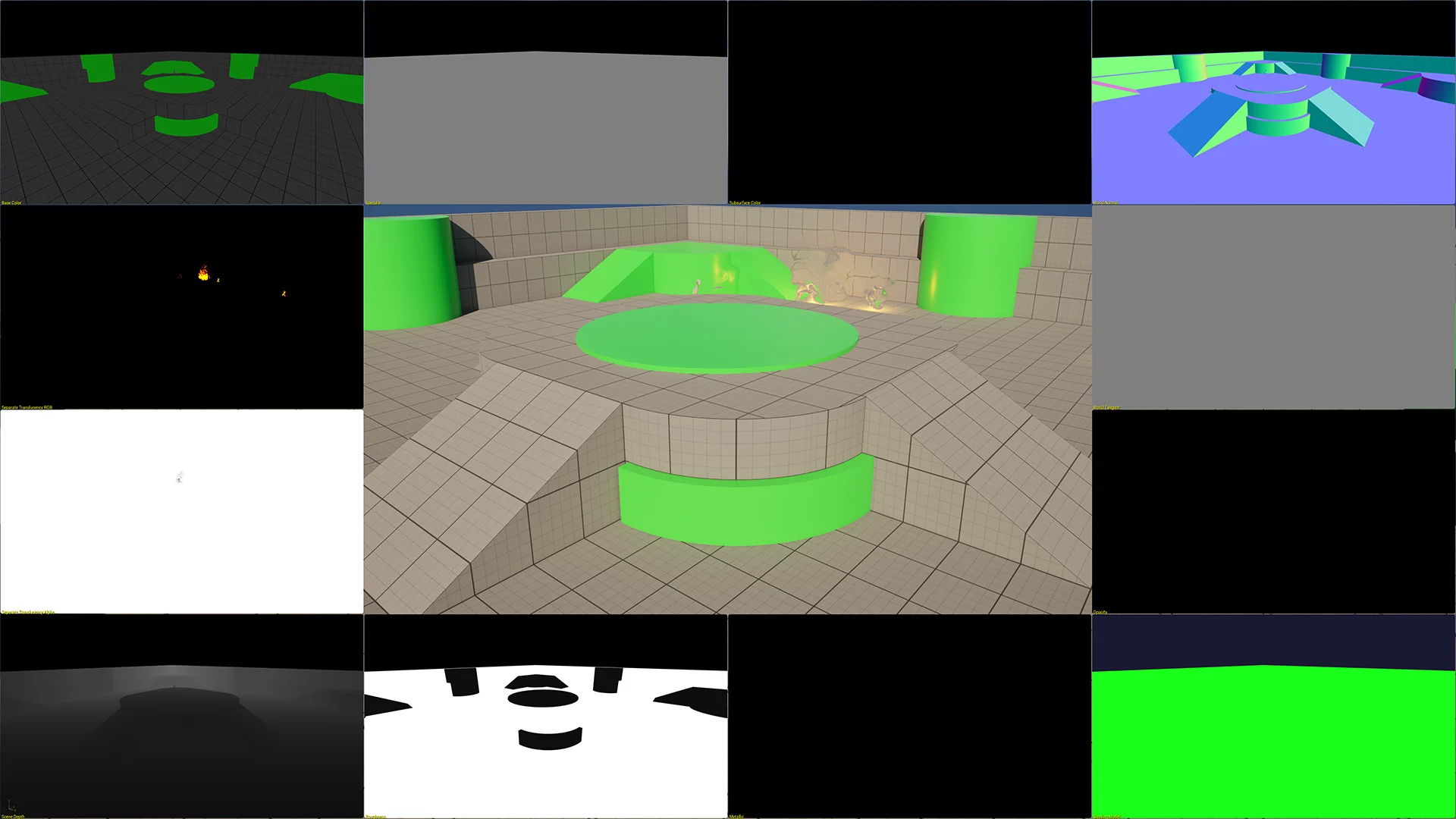
A post process material is powerful because it can read from scene textures and buffers that Unreal has already generated while rendering the frame. These buffers contain useful information about the scene, and that information can be used to drive all sorts of effects.
For example, the scene color gives you access to the rendered image itself. Scene depth tells you how far pixels are from the camera. Normal data can help detect changes in surface direction. Custom depth and stencil buffers let you mark specific actors or meshes and treat them differently in your effect.
That is how common features like outlines work. You mark selected objects into custom depth or stencil, compare neighboring pixels, detect where the shape changes, and draw a border around it. It sounds technical at first, but once you see it working, the logic becomes much easier to understand.
Depth-based effects are another great example. Because you can read how far surfaces are from the camera, you can blend fog, tint, blur, or other stylized effects based on distance. That makes it easy to create atmospheric looks, underwater transitions, focus effects, or fake volumetric fog without modifying every material or adding fog cards to the scene.
Common effects
Some of the most common uses of post process materials are outlines for interactable objects, hit flashes, damage overlays, underwater distortion, vision modes, and cinematic color effects.
Post process materials are also great for changing the mood of a scene. You can push a horror game toward something colder and harsher, warm up a sunset scene, add dream-like softness, or introduce a graphic novel feel with edge detection and posterization. These effects can be subtle or extreme depending on what the project needs.
Gameplay feedback is another big one. A lot of studios use our post process materials to communicate status changes to the player: low health, poison, stealth vision, enemy scanning, objective highlighting, and more.
Performance and optimization
As useful as post process materials are, they are not free. Like any rendering feature, they come with a cost. Because they often operate across the full screen, they can become expensive if the logic is heavy or if the effect runs at high resolution all the time.
We have many years of experience creating post process materials and know how to optimize them for high performance across PC, XR, consoles, and mobile devices. Each product page on our site clearly lists the performance impact of every effect. In most cases, our materials have little to no impact on FPS (frames per second).
A good rule is to keep the effect focused. Use the buffers you actually need, avoid unnecessary complexity, and think about when the effect truly needs to be active. You can read our material switches article to learn more about how you can make more performant materials.
If you have not visited our store yet, now is a great time to take a look. We offer more than 150 post process materials, and most product pages include before and after images so you can quickly see what each effect can do. It is an easy way to explore the variety and creative flexibility post process materials can add to your project.
Thank you for taking the time to read this article. If you have any questions, please do not hesitate to contact us through our contact page.